Vego Inventory allows users to configure and utilize AI systems to help provide recommendations, and auto-create purchase orders. The AI system uses the location’s inventory, sales and previous order data in order to provide recommendations on purchase orders or automatically create purchase orders for the location. Users can configure AI settings to meet the needs of their location.
Explore the following topics about AI Settings:
Viewing AI Settings
-
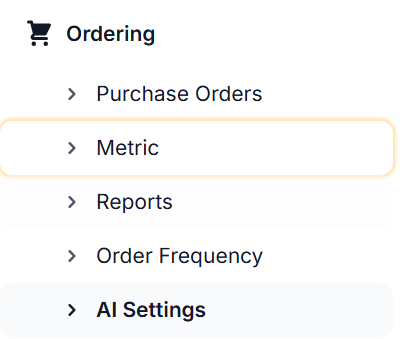
Select the Ordering tab, then select AI Settings
-
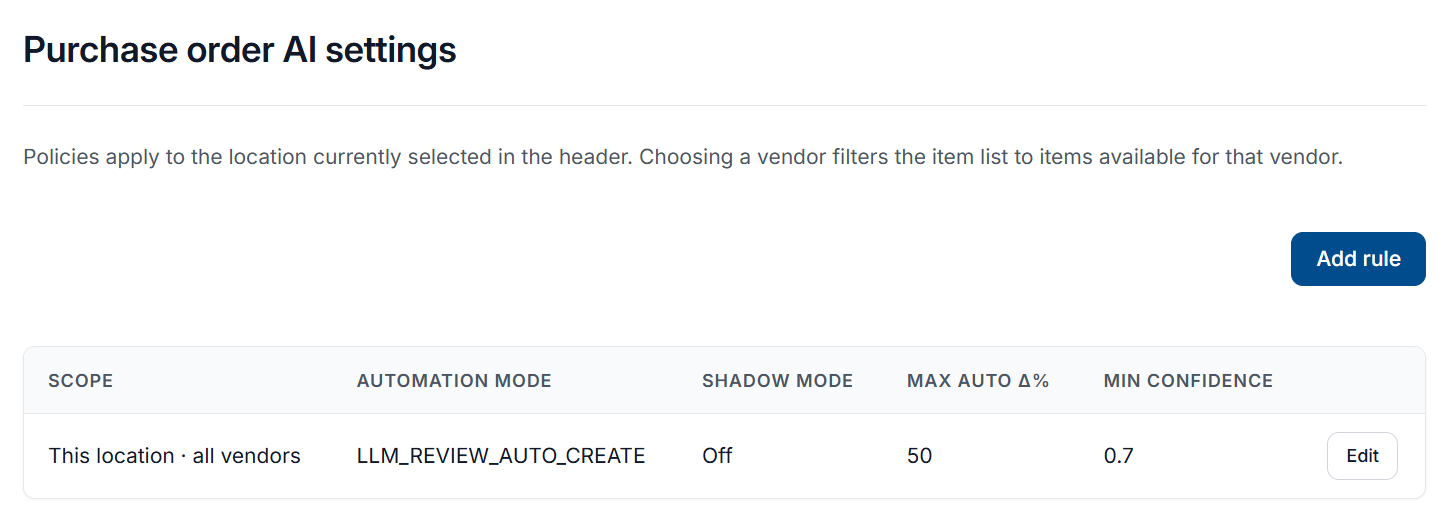
A page similar to the one below will display for the location, displaying all current AI settings
Adding an AI Rule
-
From the AI Settings page, select Add Rule
-
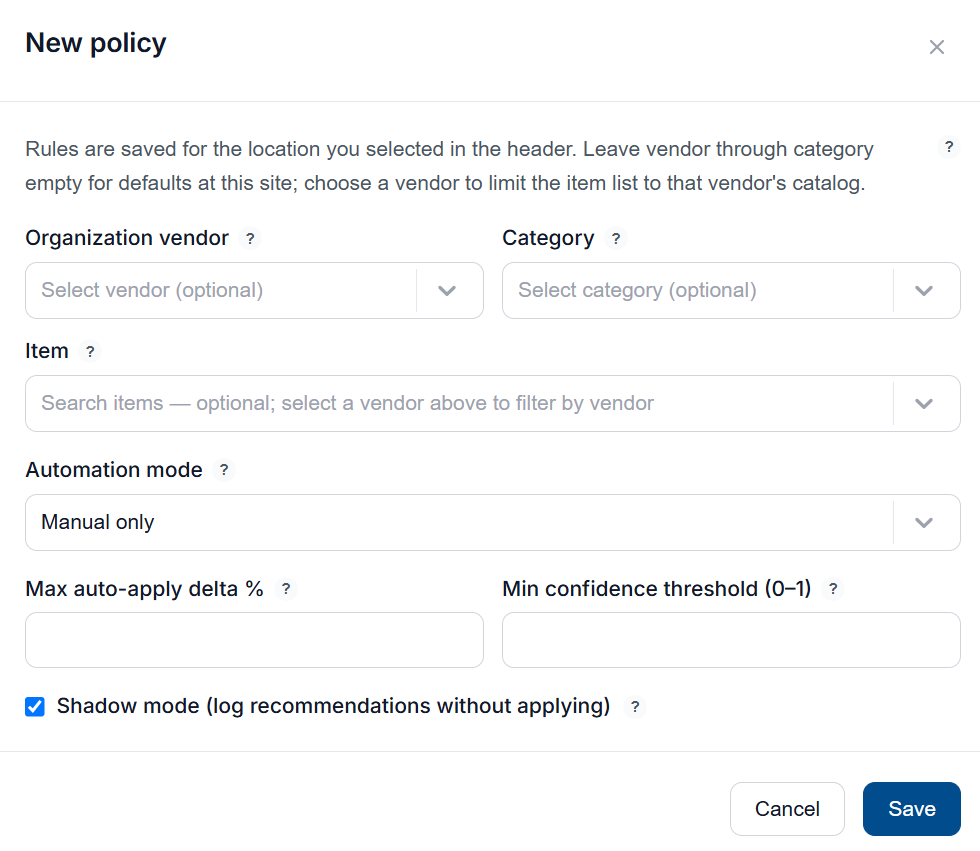
A New Policy window will display
-
Below is a list of each setting of the policy and what they represent:
|
Setting |
Description |
|---|---|
|
Organization Vendor (Optional) |
Restricts policy to items supplied by a specific vendor. Leave this field empty to apply policy to ALL vendors. |
|
Category (Optional) |
Restricts policy to items within a specific product category. Leave this field empty to apply policy to ALL product categories. |
|
Item (Optional) |
Restricts policy to a specific item. Leave this field empty to apply to all items matching the corresponding Vendor and Category. |
|
Automation Mode |
Controls how AI recommendations are acted on. Manual Only - AI will not provide recommendations on purchase orders. Users will manually adjust and create purchase orders. Deterministic Auto - AI will provide recommendations on purchase orders but will not make any changes to them. LLM Review - Human Approval - Purchase orders will use AI recommendations by default when creating and reviewing purchase orders. A user must approve the order in order for it to be placed. LLM Review - Auto Create - AI system will automatically determine if a purchase order should be generated for items, and if a purchase order can be created. Purchase order will be placed if it meets the requirements set in the policy. |
|
Max auto-apply delta % |
Maximum percentage change between the suggested order quantity and the current value that can be applied automatically without human approval. |
|
Min Confidence Threshold (0-1) |
Minimum model confidence score between 0 and 1 required before a recommendation is eligible to be shown or automatically applied. |
|
Shadow Mode |
When enabled, AI system generates logs and recommendations as normal but does not apply them or create any orders. Use this setting to evaluate AI output before enabling an auto-mode. |
-
Once you have applied your chosen settings, select Save to apply the policy
Edit an AI Rule
-
From the AI Settings page, find the rule you want to edit, and select Edit

-
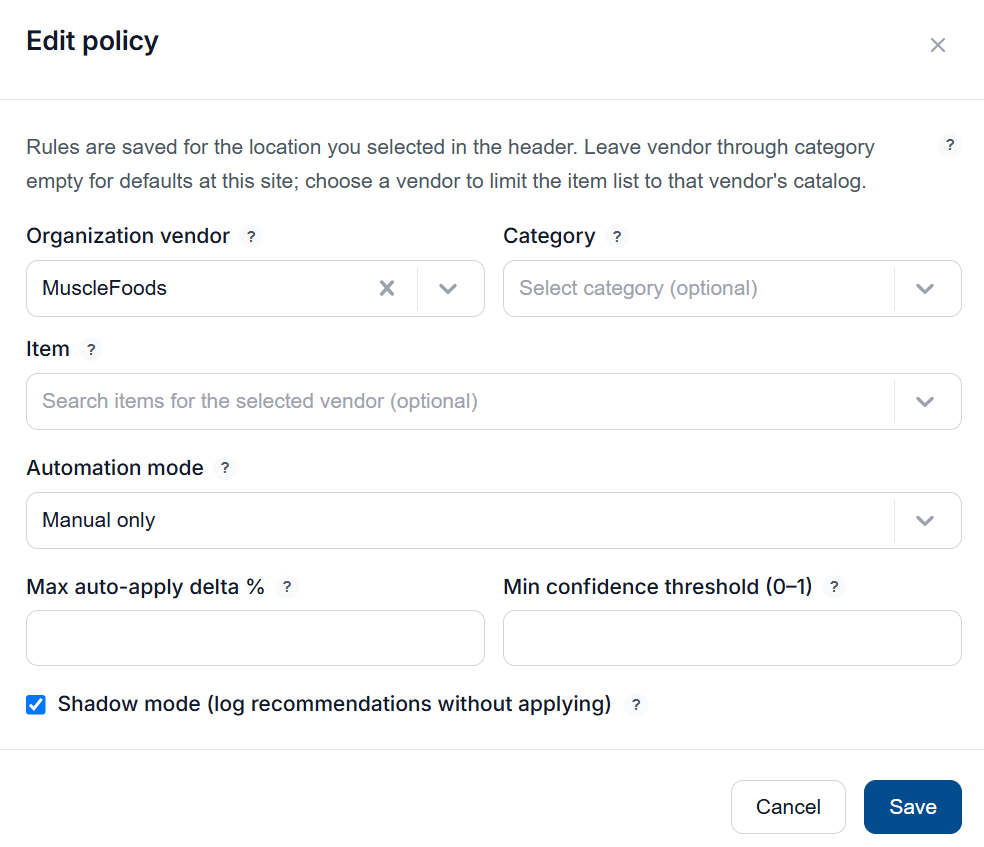
An Edit Policy window will display, showing the current settings of the rule
-
Below is a list of each setting of the policy and what they represent:
|
Setting |
Description |
|---|---|
|
Organization Vendor (Optional) |
Restricts policy to items supplied by a specific vendor. Leave this field empty to apply policy to ALL vendors. |
|
Category (Optional) |
Restricts policy to items within a specific product category. Leave this field empty to apply policy to ALL product categories. |
|
Item (Optional) |
Restricts policy to a specific item. Leave this field empty to apply to all items matching the corresponding Vendor and Category. |
|
Automation Mode |
Controls how AI recommendations are acted on. Manual Only - AI will not provide recommendations on purchase orders. Users will manually adjust and create purchase orders. Deterministic Auto - AI will provide recommendations on purchase orders but will not make any changes to them. LLM Review - Human Approval - Purchase orders will use AI recommendations by default when creating and reviewing purchase orders. A user must approve the order in order for it to be placed. LLM Review - Auto Create - AI system will automatically determine if a purchase order should be generated for items, and if a purchase order can be created. Purchase order will be placed if it meets the requirements set in the policy. |
|
Max auto-apply delta % |
Maximum percentage change between the suggested order quantity and the current value that can be applied automatically without human approval. |
|
Min Confidence Threshold (0-1) |
Minimum model confidence score between 0 and 1 required before a recommendation is eligible to be shown or automatically applied. |
|
Shadow Mode |
When enabled, AI system generates logs and recommendations as normal but does not apply them or create any orders. Use this setting to evaluate AI output before enabling an auto-mode. |
-
Once you have edited the settings of the rule to your desired settings, select Save to update the policy