Why can I not request a purchase order?
Not being able to request a purchase order can be indicative of a few potential problems
-
Invalid Items added to PO
-
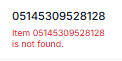
An Invalid Item means that the SKU in your Vego Inventory organization does not match the SKU in your supplier’s POS system. Because of this, Vego Inventory cannot properly communicate with your supplier. Thus, the items with the mis-matched SKU’s must be removed prior to requesting a purchase order. This issue must be resolved by an organization admin changing the SKU in Vego Inventory
-
-
Supplier out of stock
-
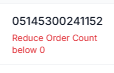
If the supplier is out of stock of one of the items that you requested, this will cause an error, and make it so that the purchase order cannot be submitted. Once the out-of-stock items are removed, the purchase order can be submitted. The item will only be available for purchase once the supplier has the item back in stock.
-
-
Response not received from server
There are a few potential fixes to this problem:
-
Wait a few moments and try to request the purchase order again
-
Make a small change to your purchase order, and then undo that change. For instance, changing the quantity of cases desired from 2 to 3, and then back to 2, will trigger a response from the server
-
An Item in the purchase order is inactive
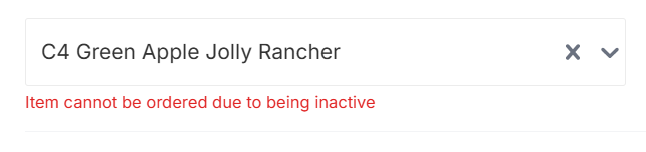
Organization administrators in Vego Inventory have the ability to activate and deactivate items. If an item is added to a purchase order and then an administrator deactivates that item, an error will occur
Why can I not approve a purchase order?
Not being able to approve a purchase order can be indicative of a few potential problems
-
Invalid Items added to PO
-
An Invalid Item means that the SKU in your Vego Inventory organization does not match the SKU in your supplier’s POS system. Because of this, Vego Inventory cannot properly communicate with your supplier. Thus, the items with the mis-matched SKU’s must be removed prior to submitting a purchase order. This issue must be resolved by an organization admin changing the SKU in Vego Inventory
-
-
Supplier out of stock
-
If the supplier is out of stock of one of the items that is requested in the purchase order you are trying to approve, this will cause an error, and make it so that the purchase order cannot be approved. Once the out-of-stock items are removed, the purchase order can be approved. The item will only be available for purchase once the supplier has the item back in stock.
-
-
Response not received from server
here are a few potential fixes to this problem:
-
Wait a few moments and try to request the purchase order again
-
Make a small change to your purchase order, and then undo that change. For instance, changing the quantity of cases desired from 2 to 3, and then back to 2, will trigger a response from the server
-
An Item in the purchase order is inactive
Organization administrators in Vego Inventory have the ability to activate and deactivate items. If an item is added to a purchase order and then an administrator deactivates that item, an error will occur